Hairstyle & Hair Color Changer
- 4.4
- Rating
- 10.00K
- Installs
- Free
- Price
 Analysis by App-foxy
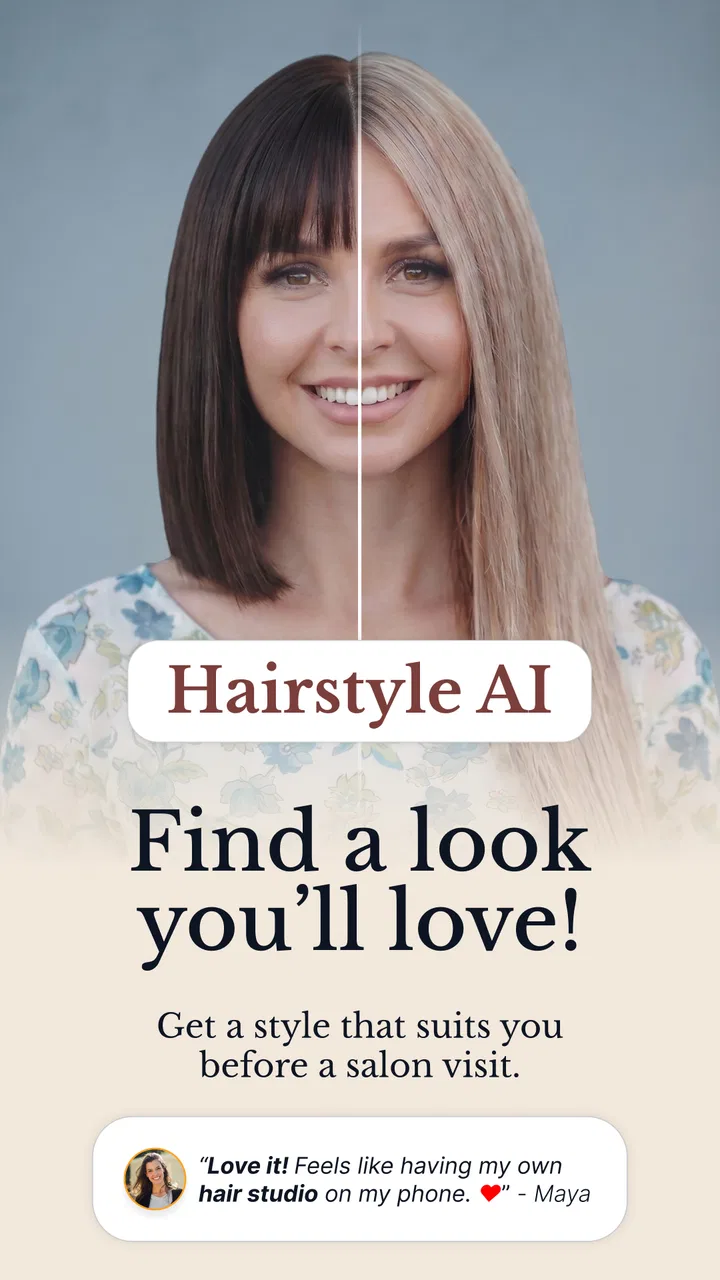
I tried Hairstyle & Hair Color Changer as a low-pressure way to explore a new look before making a real appointment, and my first impression was clear: this is more useful as a visual idea generator than as a replacement for a professional consultation. Developed by Interstellar Apps LLC, the free beauty app focuses on experimenting with hairstyles and hair colors through a large collection of combinations. That makes it appealing when you know you want a change but cannot quite explain what kind of change.
The app currently has a 4.4 average from around 271 ratings and has passed 10 thousand installs. Those figures suggest that it has found a modest audience rather than becoming a mainstream beauty platform, but they also give the app enough real-world presence to feel established for someone who simply wants to test it. It is rated for Everyone, which fits the straightforward, non-social nature of the experience.
How the current experience feels in everyday use
The central idea is simple: browse different hair possibilities, combine styles and colors, and use the results to narrow down what you might actually want. The store summary points to more than 5 thousand combinations, so the strongest part of the experience is the breadth of ideas. Instead of searching separately for a bob, a fringe, copper tones, or lighter shades, I can approach the app as a visual mood board and compare directions in one place.
You May Also Like

 AccuWeather: Weather Radar
AccuWeather Review: A Quick, Clear Forecast for Everyday Decisions
For everyday plans, the best forecast is the one you can understand quickly. AccuWeather makes rain timing, radar, and local conditions easy to act on, with a few trade-offs.

 Hill Climb Racing
Why Hill Climb Racing Still Turns Crashes Into One More Run
A tiny car, a bumpy hill and one more upgrade: Hill Climb Racing keeps resurfacing because its simple chaos makes every near-miss feel personal.

 AliExpress - Shopping App
AliExpress Makes Global Shopping Feel Personal, but Shoppers Bear the Risk
AliExpress turns a global marketplace into a pocket-sized discovery engine. Its reach is useful, its shopping loop compelling, and its trade-offs easy to miss.

 Lords Mobile: Kingdom Wars
Lords Mobile Is a Kingdom-Building Routine, Not a Quick Match
A case-by-case verdict on the building, battles, device demands, and social commitments that make Lords Mobile rewarding for some players and exhausting for others.

 PDF Scanner app - TapScanner
TapScanner Makes Paperwork Easier to Capture, Check, and Share
TapScanner makes scanning with a phone feel less like a rescue operation and more like a dependable step in getting work done. Its capture tools are useful, though not flawless.

 Block Blast!
 Shows How Much a Puzzle Game Can Leave Out
A quiet grid game shows why puzzle players increasingly value instant clarity, repeatable skill and low-pressure play—and where the genre still needs to catch up.
More From Our News Desk
View All News


That distinction matters. A hairstyle preview is not a promise of how a cut will look in real life. Hair texture, density, curl pattern, face shape, lighting, and the skill of the stylist all affect the final result. I found the app most helpful when I treated each preview as a question to investigate: do I like the general length, the color family, or the amount of change? It is less reliable when used as an exact blueprint.
A realistic use case is preparing for a salon visit. I might have an appointment coming up and only a vague idea that I want something fresher. Rather than saving random images from several websites, I can spend a few minutes comparing related options inside the app. The useful outcome is not necessarily one perfect image. It is being able to tell a stylist, “I prefer this length, but with a softer color,” or “I like the shape, but not the heavy fringe.” That makes the conversation more precise.
The app also works for smaller decisions. Someone considering a subtle color shift can compare warm and cool directions before committing. A person growing out a familiar cut can explore an intermediate style instead of jumping straight to a dramatic transformation. I especially like this staged approach because it reduces the common mistake of judging a hairstyle only as an all-or-nothing change.
Why the large combination library is useful
The number of combinations is valuable not simply because it sounds impressive, but because it encourages comparison. A single preview can be misleading; a group of nearby alternatives reveals what you actually respond to. I recommend changing one variable at a time whenever possible. Compare the same general cut in different shades, then compare similar colors across different lengths. This turns casual browsing into a more useful decision process.
One non-obvious benefit is that the app can help separate a haircut preference from a color preference. I may initially think I want a new cut, but after seeing several versions I might discover that the color is doing most of the visual work. Conversely, a shade that looks exciting with long hair may feel less appealing with a shorter shape. Keeping those choices mentally separate can prevent an expensive salon decision based on a misleading combination.
I also found it sensible to save or note a small shortlist rather than collecting dozens of looks. A huge library can create choice fatigue. Three or four related possibilities are easier to compare and easier to discuss with a stylist. If I keep scrolling without a clear purpose, the app becomes entertainment rather than a decision tool.
What the latest listed version tells existing users
The current version is 1.0.10, while the app was released on May 21, 2026. That places it in a relatively early stage of its product life, so I would view the present experience as a foundation rather than a finished beauty ecosystem. The version number shows that the developer, Interstellar Apps LLC, has already moved beyond the initial release, but the available facts do not justify assuming that every future update will bring a particular feature.
For someone installing it now, the practical takeaway is to judge the app by what is available today: a focused hairstyle and hair-color exploration tool with a broad set of combinations. Existing users who have been following its development may notice that the version has progressed, but I would not install it solely because of the number attached to the release. The value comes from whether the current browsing and preview workflow matches what you need.
This early-stage position has two sides. A focused app can feel easier to understand than a large beauty platform filled with feeds, tutorials, influencers, shopping tools, and social features. At the same time, a newer product may feel less polished in the small details that matter during repeated use, such as organizing favorites, comparing results efficiently, or moving from inspiration to a salon-ready reference.
Where it fits beside familiar alternatives
The usual alternatives are image searches, social-media boards, salon consultation tools, and professional advice. Each has a different strength. Image searches provide variety and real-world examples, but the results can be inconsistent and difficult to compare. Social platforms offer inspiration from people with different hair types, yet they can also push trends rather than helping you identify what suits your own preferences.
A professional consultation remains the better option when the decision involves major chemical treatment, a complex correction, or a cut that depends heavily on hair condition. A stylist can assess factors that a visual app cannot. On the other hand, a consultation is not always the easiest first step when I am still unsure what I want. This app occupies that useful middle ground: private experimentation before asking someone else to interpret a vague idea.
Compared with a general photo editor, its advantage is focus. I do not need to build an effect manually or search through unrelated editing controls. The trade-off is that a dedicated hairstyle app may give me less creative control over the image itself. If my goal is a polished portrait edit, a broader editor may be better. If my goal is to explore hair directions quickly, the specialized approach is more convenient.
Practical ways to get more from the app
My first tip is to begin with the least dramatic change that could still make you happy. Try nearby lengths or shades before moving to a completely different look. This creates a useful baseline and helps reveal whether the app is showing a genuine preference or merely the excitement of novelty.
My second tip is to evaluate the shape and the color separately. A vivid shade can distract from an unappealing cut, while a flattering cut can make an unfamiliar color seem more wearable. I would make two shortlists: one for cuts and one for colors. Only combine them after deciding which elements work independently.
My third tip is to use the app before, not during, an appointment. Browsing in the salon can make me choose quickly under pressure. Exploring at home gives me time to reject options that looked exciting for a moment but do not fit my routine. I can then bring a small, coherent set of ideas to the stylist rather than presenting an overwhelming gallery.
A fourth useful habit is to think about maintenance. A preview may make a high-maintenance look seem effortless, but real hair requires time, products, regular trims, and sometimes repeated color appointments. Before choosing a dramatic option, I would ask myself how often I am willing to style it and how noticeable regrowth might be. The app can start that conversation, but it cannot answer it for me.
Limitations that affect the decision
The biggest limitation is the gap between a visual preview and real hair. Even an appealing result may not translate directly to thick, fine, straight, wavy, or tightly curled hair. The same color can also appear different depending on existing dye, natural pigment, indoor lighting, and the condition of the hair. I would never treat a preview as evidence that a particular color process is safe or achievable in one appointment.
The large library can also work against the user. More options do not automatically mean better decisions. Without a clear method, I can spend too long browsing and finish with more uncertainty than I had at the start. The one-variable-at-a-time approach helps, but people who dislike visual comparison or want a quick recommendation may find the experience less satisfying.
There is also a financial point to keep in mind. The app is free to download, while in-app purchases are listed at $14.99 per item. That does not make the free entry point unattractive, but it does mean I would pay attention to which parts of the experience require additional spending before becoming invested in a particular workflow. For casual experimentation, the free starting point may be enough; someone planning to use it repeatedly should consider whether paid items add enough value.
Because the content rating is Everyone, the app is positioned as broadly accessible. That is useful for families or younger users interested in harmless style exploration, but younger users may still need guidance before treating a preview as a reason to make a permanent chemical change. The age rating describes the suitability of the app’s content, not the suitability of every real-world hairstyle decision.
Who should use it and who should skip it
I would recommend it to someone who is undecided, curious, or preparing for a salon conversation. It is particularly helpful for people who struggle to describe a desired change in words. It can also suit users who want a private space to experiment without posting photos publicly or asking friends for immediate opinions.
It is less suitable for someone who expects an exact simulation of their own hair or a professional diagnosis. If the main question is whether a particular color can be achieved over previously dyed hair, a stylist is the right source of advice. If the goal is to edit a personal photograph with precise control over every strand, a general photo-editing tool may be more appropriate.
I would also skip it if I already know exactly what I want and have a trusted reference image. In that situation, the app’s range may add unnecessary browsing. Its real strength is helping with uncertainty, not replacing a clear plan.
What I would watch as the app develops
Since the product is still at version 1.0.10, I would watch how the experience evolves rather than assuming that a large library alone will carry it long term. The most meaningful improvements would be those that make comparison easier: clearer ways to organize a shortlist, smoother movement between related cuts and colors, and practical support for turning inspiration into a useful salon reference.
I would also pay attention to whether future development keeps the app focused. Adding more combinations could be helpful, but only if browsing remains manageable. A smaller, well-organized set can be more useful than an enormous collection that leaves users lost. For me, the best direction would be better decision support rather than simply more visual choices.
At present, I see Hairstyle & Hair Color Changer as a convenient first step for people who want to explore before committing. Its free entry point, Everyone rating, and focused beauty purpose make it easy to try, while the broad combination library gives it more practical value than a single-style preview. The paid items are worth considering before regular use, and the previews should always be treated as inspiration rather than a guarantee.
My honest recommendation is to use it with a specific workflow: browse calmly, compare one feature at a time, keep a short list, and take the final decision to a professional when the change involves serious cutting or coloring. Used that way, it can turn “I want something different” into a clearer and more realistic plan. Its best result is not choosing a hairstyle inside the app; it is helping you make a better choice outside it.
FAQs for Hairstyle & Hair Color Changer
01What is Hairstyle & Hair Color Changer, and what can I do with it?
Hairstyle & Hair Color Changer is a photo-editing app designed to help you preview different hairstyles, haircuts, and colors before making a real change. After selecting or taking a portrait, you can experiment with various looks, adjust their position, and compare options. It is mainly intended for visual inspiration and entertainment rather than providing a perfectly accurate prediction of salon results.
02How do I use the app to try a new hairstyle or hair color?
Start by importing a clear, front-facing photo from your device or taking a new picture with the camera. Choose a hairstyle, haircut, or color from the available categories, then place it over your hair and adjust its size or position when necessary. Results are usually more convincing when your face is well lit, your hair is visible, and the photograph has minimal background clutter.
03Does Hairstyle & Hair Color Changer produce realistic results?
The app can provide a useful impression of how a particular style or color might look, but the result should not be treated as an exact simulation. Image quality, face angle, lighting, existing hair length, and the selected template all affect the final appearance. Some effects may look more natural than others, so it is best to use the edits as inspiration and discuss the desired result with a professional stylist.
04Is Hairstyle & Hair Color Changer free to download and use?
The application may be available to download at no initial cost, but some hairstyles, colors, editing tools, or export options can depend on the version installed and its monetization model. Users may encounter advertisements, in-app purchases, or premium content. Before confirming a purchase or subscription, review the store listing carefully and check the payment terms, renewal conditions, and cancellation options.
05What should I know about privacy before uploading photos?
Because the app works with personal images, it is important to review its privacy policy and the permissions requested during setup. Check whether photos are processed directly on the device or uploaded to an external service, and understand how saved images may be stored or used. Avoid uploading photographs containing sensitive information, and grant camera or photo-library access only when you are comfortable with the app’s requirements.
Pros
- Offers many hairstyle options for quick visual experimentation.
- Hair color previews make it easier to compare bold and subtle shades.
- Useful for planning a salon visit or discussing ideas with a stylist.
- Simple editing tools are accessible to users with little photo-editing experience.
- Can provide inspiration when choosing a new cut or color.
Cons
- Results may look unrealistic with poor lighting or an unsuitable photo.
- Some hairstyles or color effects may require in-app purchases.
- Face and hair detection can struggle with curls
- hats
- or unusual angles.
- The app may need access to personal photos and camera features.
- Virtual previews cannot accurately show real texture
- volume
- or maintenance needs.

Hairstyle & Hair Color Changer
Gallery